

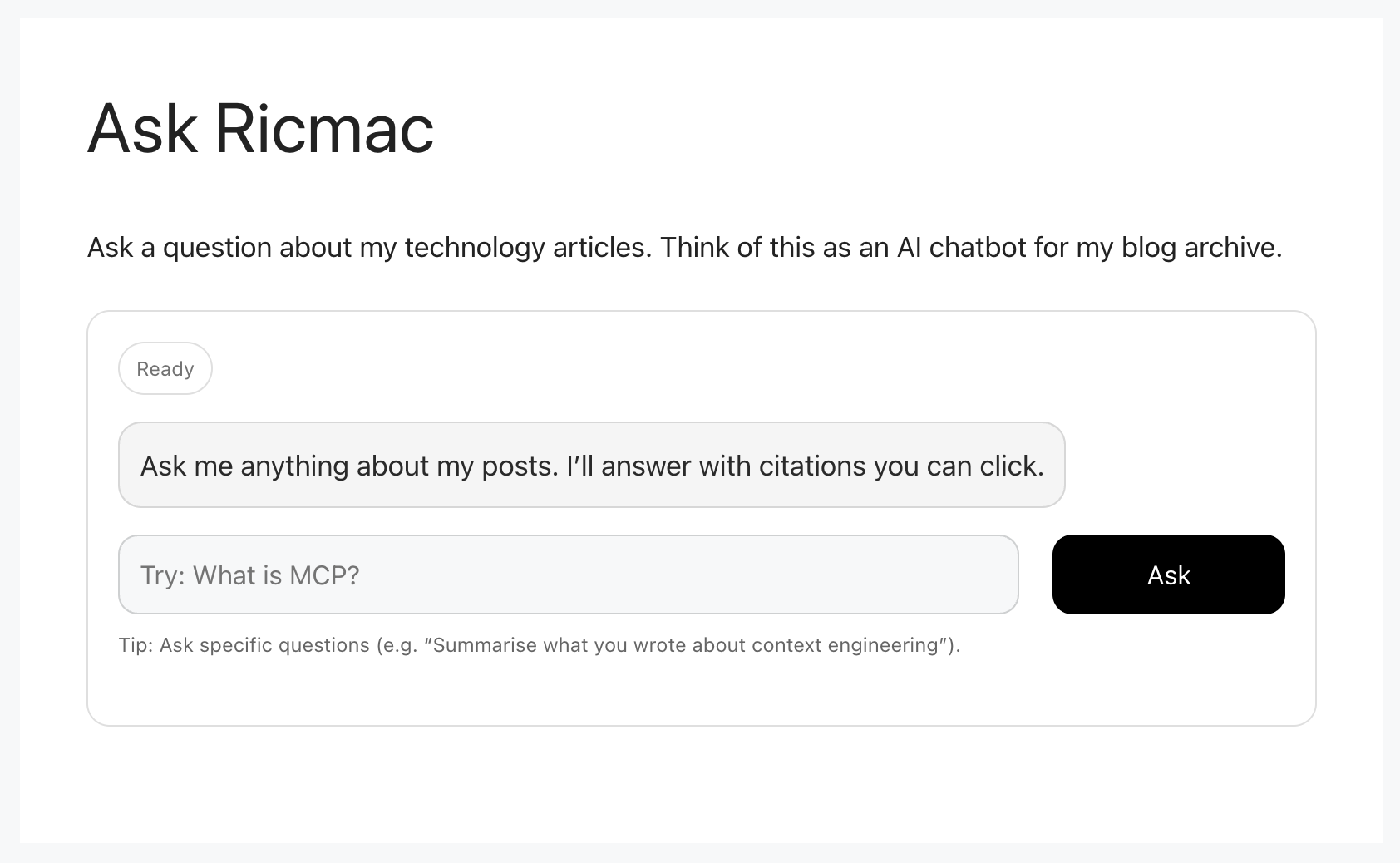
Over the past few months I’ve been exploring what I think of as the agentic web stack — the emerging intersection of artificial intelligence with the open web. As part of that exploration, I built a small experiment for my personal website: an AI chatbot called Ask Ricmac. Its purpose is simple: instead of searching my site manually, a visitor can ask a question and receive an AI-generated answer based on the articles I’ve written over the years.
Under the hood, Ask Ricmac runs on a Cloudflare Workers backend that uses Vectorize, D1 and Workers AI. During development, I also used the WordPress MCP Adapter and Claude Desktop. In this post I’ll explain how these pieces fit together and the role each one plays.
This project is an example of a server-side MCP application, meaning that the AI logic runs on backend infrastructure and the results are delivered to the website. In my next post I’ll explore the other side of this idea: a client-side MCP application running directly in the browser using WebMCP.
The idea: an AI interface to website content
Let’s start with an explanation of my data store. In addition to all the blog posts I’ve published on ricmac.org over the years, I also have copies of all the journalism I’ve written over the past decade and more — basically, all my work since leaving ReadWriteWeb in October 2012. It includes hundreds of tech analysis articles for Newsroom (a New Zealand news operation), Stuff (kind of The New York Times of NZ, despite the terrible name), and The New Stack (which I recently finished up at).
Traditionally, readers would navigate that content using search or category pages. But large language models offer another interface: conversation.
Instead of searching, a reader can ask a question like:
- “What was ReadWriteWeb?”
- “What is the agentic web stack?”
- “What is MCP and where did it come from?”
- “What are the origins of blogging?”
(Feel free to open the Ask Ricmac page now — that link opens a new tab — and ask a question to get a feel for the app.)
The system I built retrieves relevant content from my site and uses an AI model to generate an answer. Technically, this pattern is known as retrieval-augmented generation (RAG). But unlike a typical AI chatbot, like ChatGPT or Claude, the model doesn’t rely only on its training data — it retrieves information from a knowledge base first. And in this case, the knowledge base is my own website content.
The architecture
To build Ask Ricmac, I experimented with several emerging technologies from the agentic web stack. Some of these tools were used during development, while others form the runtime architecture of the application.
I started with the following tools:
- WordPress MCP Adapter
- Claude Desktop
These helped me experiment with AI access to WordPress via MCP servers. But to turn this into a working feature of my website, I used the following runtime technologies:
- Cloudflare Workers
- Cloudflare Vectorize
- Cloudflare D1
- Cloudflare Workers AI
These components together power the deployed Ask Ricmac application.
At a high level, this is the runtime architecture:
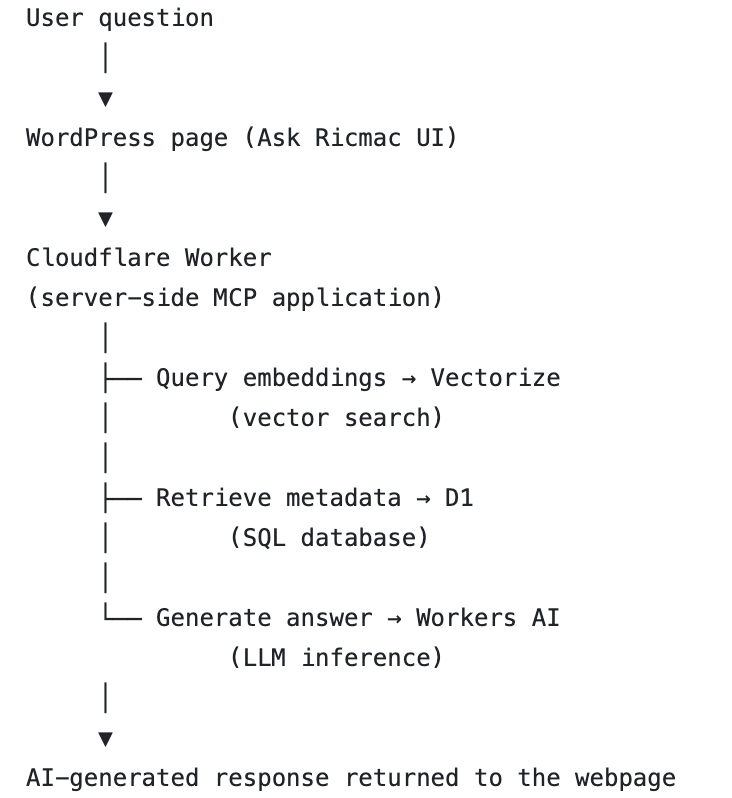
I’ll explain each of these components in the rest of the article, but the TL;DR is that this stack enabled me to add an AI interface to my large archive of technology analysis articles.
Before going further, a note about how the system was built. This post isn’t a tutorial, because I used ChatGPT as my coding partner while developing the app. I wouldn’t call it “vibe coding,” because I always pay close attention to the code in order to understand how it works. But the reality is that AI produced much of the code while I orchestrated the process. So my goal here is to explain the architecture and thinking behind the system, rather than provide step-by-step instructions.
WordPress MCP Adapter: exposing the site to AI
During development, one of the first challenges was figuring out how an AI system could access the content of my site.
My personal website runs on WordPress, so during development I used the WordPress MCP Adapter to expose the content as tools that an AI agent can call.
MCP stands for Model Context Protocol, an emerging standard for connecting AI systems to external tools and data sources. Instead of hard-coding integrations, MCP lets developers define capabilities — such as “search posts” or “retrieve page content” — that an AI system can invoke when needed.
So the WordPress adapter turns WordPress into an AI-accessible data source.
For example, it can provide tools like:
- searching posts
- retrieving post content
- listing recent articles
Essentially, this creates a bridge between a traditional CMS and modern AI agents.
Claude Desktop: the development environment
To experiment with these MCP tools during development, I used Claude Desktop.
Claude Desktop acts as a kind of AI development environment. It allowed me to create and manage a couple of MCP servers, so that I could interact with the tools the WordPress adapter exposed. I first created an MCP server for a local version of my WordPress setup (run via MAMP), so that I could test everything on a site that wasn’t online. Then once I was sure it was working as expected, I created an MCP server for the production version of ricmac.org.
Once connected, Claude can decide when to call the WordPress tools in order to answer a question.
For example, if I ask:
“What is Cybercultural?”
Claude can choose to call a tool that retrieves the relevant page(s) from my site before generating a response. This interaction between the model and external tools is one of the key ideas behind the emerging agentic web — AI systems that can reason about when to access external resources.
Claude Desktop was very useful for testing this behaviour while I was developing Ask Ricmac. In the next post in this series, I’ll explore how this same idea — AI systems interacting with web pages through tools — can move directly into the browser using WebMCP.
Cloudflare Workers: the serverless backend
Once I had experimented with AI access to my WordPress content, the next step was building the application itself. The deployed Ask Ricmac system runs on Cloudflare Workers.
Workers are Cloudflare’s serverless runtime that executes code at the network edge. Instead of running a traditional server, developers deploy small scripts that respond to requests.
In the Ask Ricmac project, the Worker acts as the backend orchestrator. It performs tasks such as:
- receiving a user question
- retrieving relevant documents from a vector database
- sending the context to an AI model
- returning the generated answer
Running this logic on Workers keeps the architecture simple and scalable.
Vectorize: storing semantic embeddings
To make retrieval work, the system needs a way to find relevant pieces of content based on meaning rather than keywords. This is where Cloudflare Vectorize comes in.
Vectorize is a vector database designed for AI applications. It stores embeddings, which are numerical representations of text generated by an AI model.
Each article from my website was converted into embeddings and stored in the database. This part of the development process actually took the longest for me. I used curl from the Mac Terminal to upload the data in chunks to the vector database; after a bit of trial and error, I discovered I could only get it to “ingest” 3 posts at a time. So it took a while to complete this process.
How does this work at a user level?
When a user asks a question, the system converts that question into an embedding. The database can then perform a similarity search to find the most relevant content. The idea is that this process allows the system to retrieve passages that are semantically related to the user’s question, even if the exact words don’t match.
Vector databases have become a foundational component of modern AI applications, especially those built around retrieval-augmented generation (RAG).
D1: storing structured data
Alongside the vector database, I used Cloudflare D1, which is a lightweight SQL database.
While Vectorize handles semantic search, D1 stores structured data about the content itself — such as metadata, IDs, and references to the original articles.
Together they provide both semantic search and traditional data storage. This combination is common in AI applications that integrate with existing content systems.
Workers AI: generating the answer
Once the system has retrieved relevant passages, it needs a model to generate the final response. For this, I used Cloudflare Workers AI, which provides access to a range of open-weight AI models directly inside the Workers runtime.
The Worker sends the retrieved content and the user’s question to the model, which then generates an answer grounded in that material.
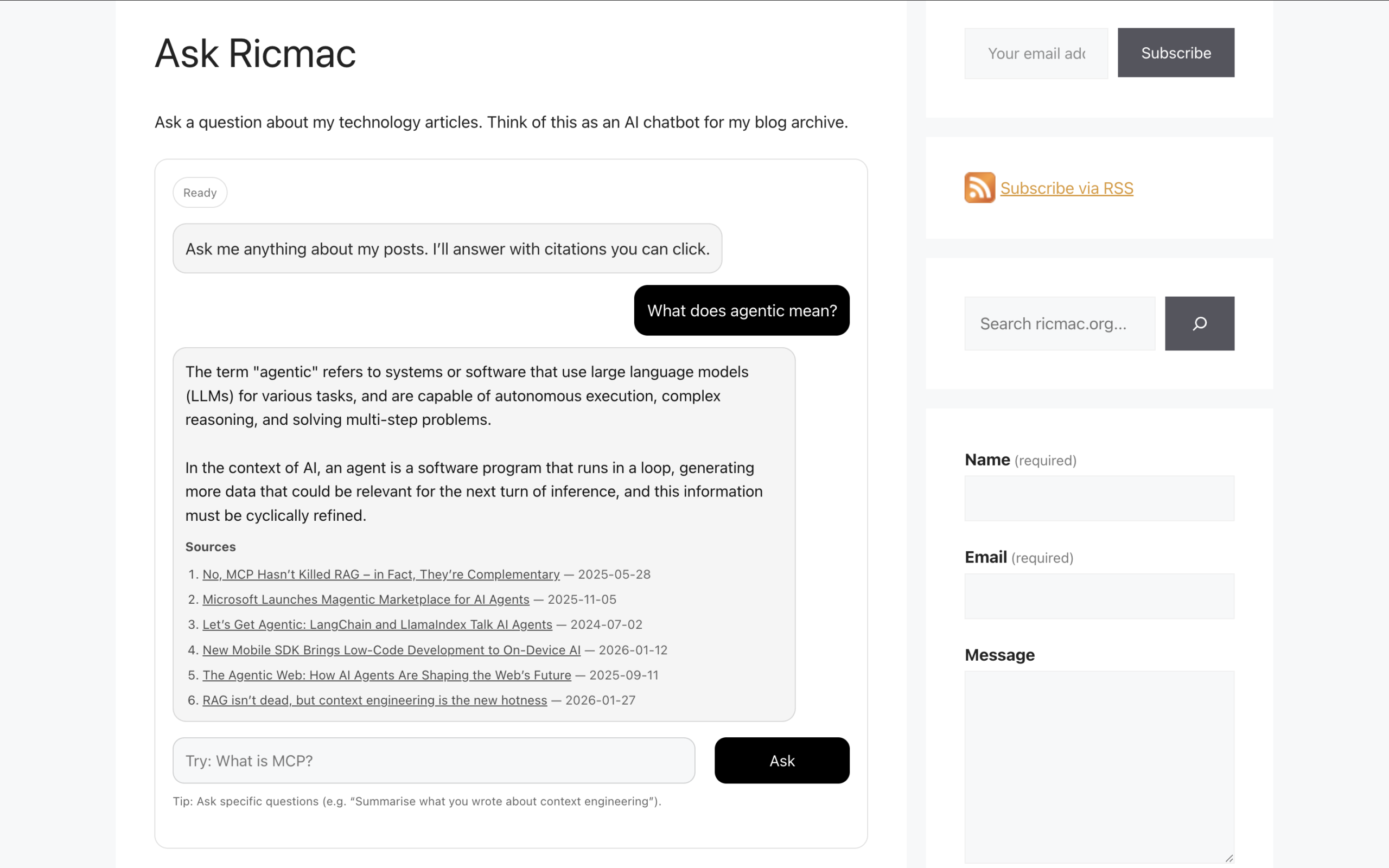
Because the model is running through Workers AI, the entire process stays inside the Cloudflare environment. That simplifies deployment and keeps latency low.
A small step into the agentic web era
In summary then, Ask Ricmac works like this: a user question is sent to a Cloudflare Worker, relevant content is retrieved from a vector database, and an AI model generates a response grounded in my published articles.
For many years, the web has been about publishing content for human readers. But increasingly, it will also be about exposing content and capabilities to AI systems. Now, with that said, I still think the primary purpose of a website is to serve content to fellow humans. But the fact is, AI is rapidly becoming a default interface to the web; and I believe it’s up to website publishers to adapt to that reality.
This experiment is only the beginning. If you’d like to follow my journey to become an agentic web expert, subscribe to ricmac.org via RSS or email.
Feature image via Unsplash.