

I’ve been using the term “Agentic Web” a lot in recent articles to describe what I’m exploring: how AI systems integrate with the open web. Another term you might be familiar with is “Web AI,” which derives from Google and has a more specific meaning: running client-side AI in the browser.
Google’s concept of Web AI includes doing the inference — when AI models process queries — on your local device, rather than in the cloud. To achieve this, you need to install a small on-device model (often called a “small language model” or SLM). Not coincidentally, Google has just such a product for you: Gemini Nano, an on-device model of typically a few gigabytes, which is much smaller compared to large cloud models that require significant server-side resources.
Running inference locally is a relatively edge case at this point in time. It’s increasingly possible to run MCP-connected applications in the browser — such as my own Ask Ricmac chatbot — but the actual AI processing is typically done in the cloud (in my case, I use Cloudflare Workers AI). Even with WebMCP, an emerging protocol that enables websites to expose structured capabilities to AI agents, the idea isn’t that everything is done locally; rather, it’s that the browser becomes a mediator between your website and (mostly) cloud-based AI.
Running AI models locally does have a lot of potential, though: primarily, it gives the user much better privacy controls, because your private data isn’t going back and forth from the cloud. Also, you’re not paying a cloud provider per request. Finally, using SLMs can reduce latency (although, as I will explain, right now that’s not feasible for many of us).
Over time, local AI — sometimes called “on-device AI” — will become increasingly viable, as our computers and smartphones increase RAM and storage capabilities, and also as AI models get ever smaller and smarter.
Given the clear potential, I wanted to test local AI here on ricmac.org. So in this post I’ll describe how I implemented an “article assistant” on my technology analysis articles, which defaults to local AI if available.
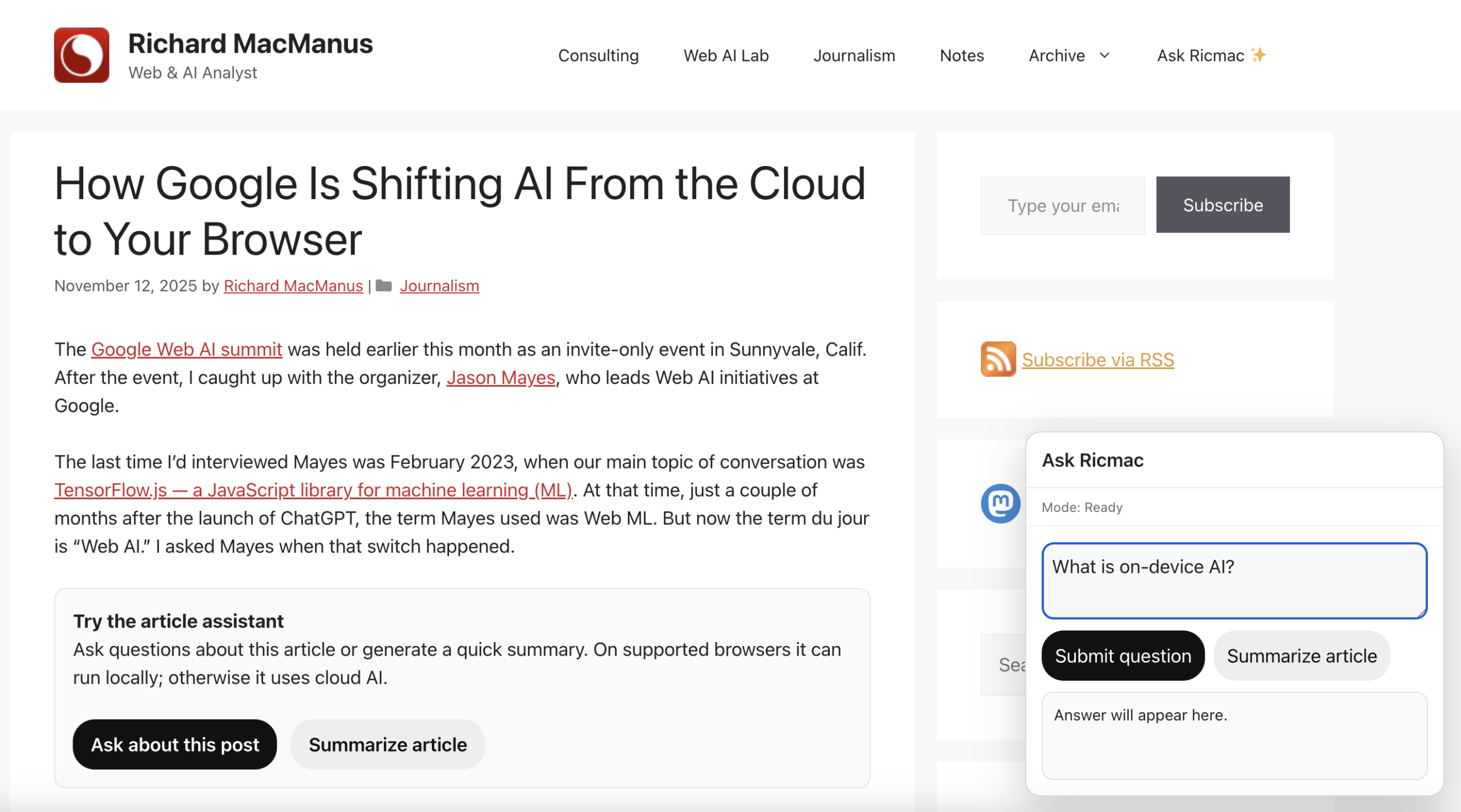
This feature — which you can see in action on this very post on my website, under the second paragraph — allows readers to ask questions about the article or generate a quick summary. On supported browsers it can run entirely locally; otherwise it uses cloud AI.
This post is a conceptual walkthrough of how my article assistant works, and what each piece of the stack is responsible for.
The starting point: AI that runs on your machine
The first piece of the puzzle was getting a model running locally in the browser. For this, I experimented with Gemini Nano — Google’s lightweight, on-device model designed to run in environments like Chrome.
It’s important to note that to use Gemini Nano in my app, I will be relying on Google’s built-in AI APIs for developers (which are currently only available in Chrome’s experimental builds, such as Canary). So practically speaking, I’m not invoking the model directly. My code will call a browser API, and Chrome handles the rest — routing the request to its on-device AI runtime, which runs Gemini Nano locally if it’s available.
Back to Gemini Nano. The first problem I ran into was that I needed about 22GB of spare storage on my computer to run it. My current laptop is a 2022 Macbook, so it doesn’t have state-of-the-art specs. In fact, when I first went to install Gemini Nano, the process failed as I only had about 11GB of storage to spare. So I had to delete a bunch of old applications; I also cleared about 15GB of cache, which finally gave me more than enough space.
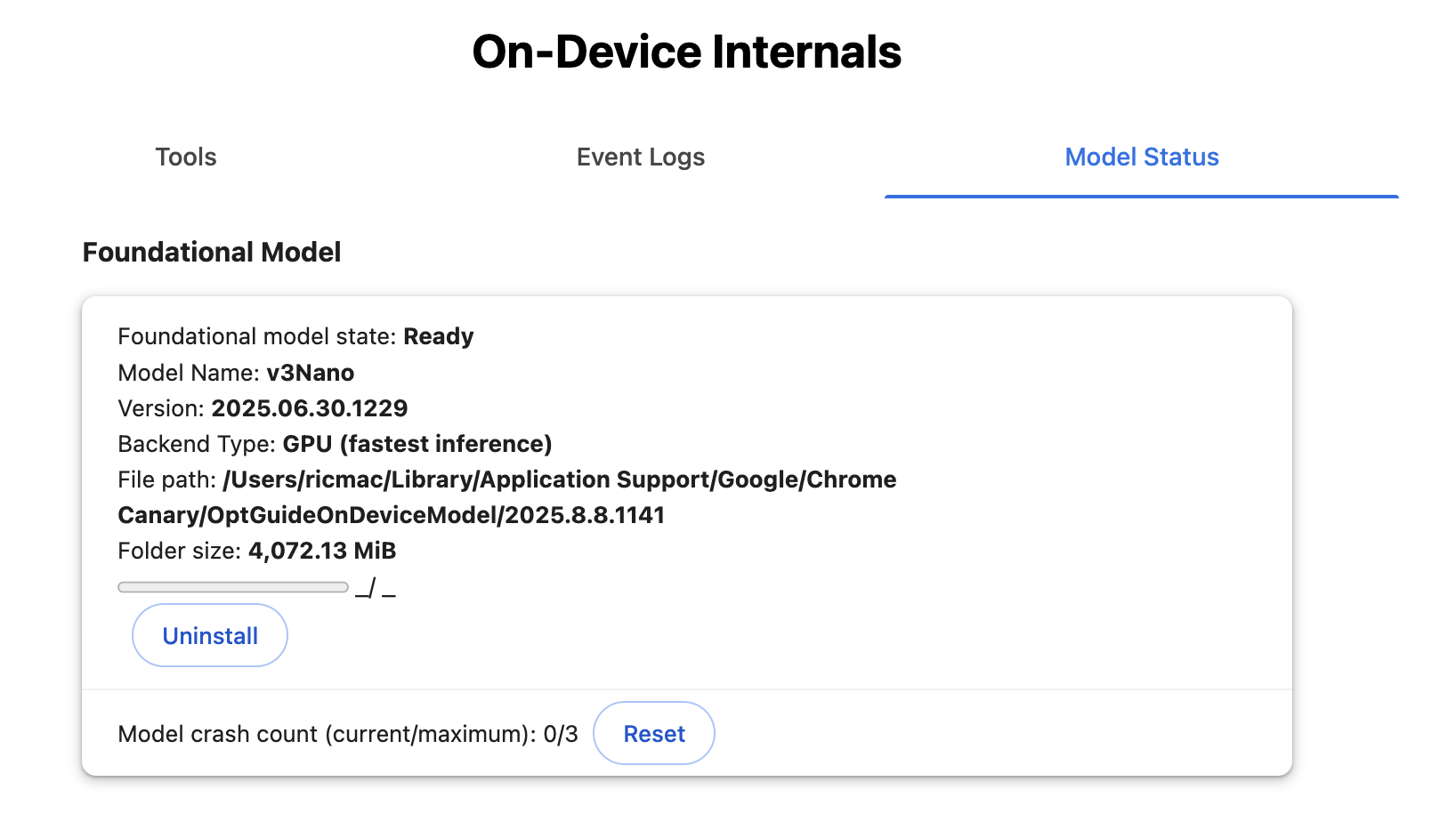
You also need at least 8GB of RAM to run Nano; my laptop has exactly 8GB. Because my device is at the minimum required level of memory, I later discovered that the inference was slower than using a cloud AI model (hence my note above about latency not necessarily being better when running a model locally!).
All this means that local AI in the browser is far from being a universal runtime at this time. At best, it’s an emerging capability that only works in quite specific conditions.
So that shaped the architecture of my article assistant: local AI couldn’t be the only path. It had to be one option. I’ll get to how I dealt with that later in this post, but for now let’s stick with the local AI implementation.
Local AI in Chrome: a new kind of runtime
Once I had Gemini Nano available, the next step was wiring it into my webpage.
As noted above, the model is exposed through browser APIs, which means:
- The execution happens locally
- There’s no dependency on external infrastructure
Conceptually, this is a shift for all of us who’ve gotten used to the ChatGPT or Claude model of AI, where the AI inference is done in the cloud.
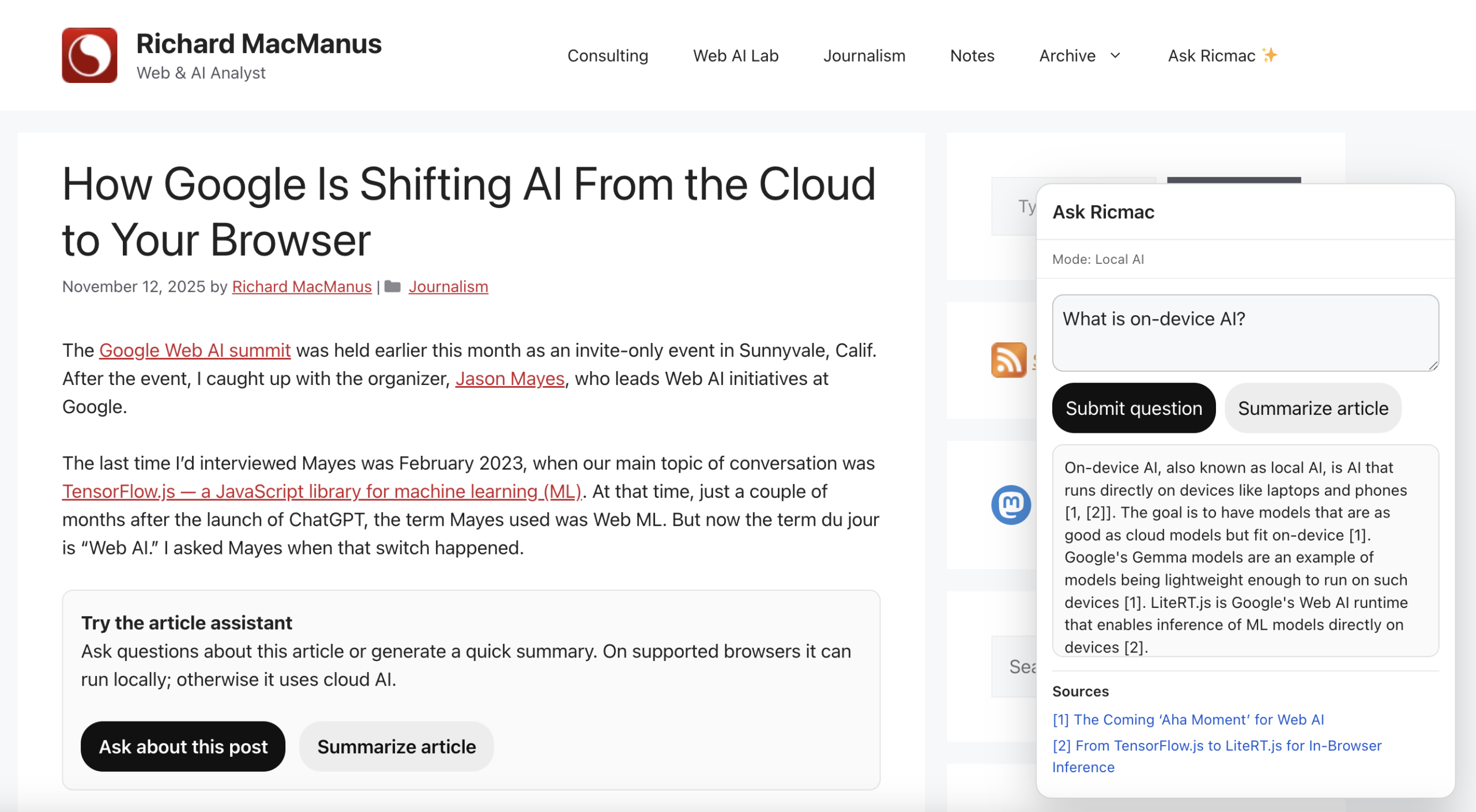
In this case, the browser is no longer just a client talking to an AI service — it’s becoming an AI runtime itself. As Microsoft’s Maxim Salnikov put it in a LinkedIn post earlier this week:
“The web platform has always been about reach and universality. Now it might also become one of the most important runtimes for AI.”
If the runtime concept sounds familiar, that’s because web applications these days commonly run using a variety of client-side tricks, using React and similar JavaScript frameworks. There are other similarities. Like some of the more notorious React apps, using local AI requires a hefty upfront “cost” in terms of the initial download. Although, unlike with React apps, it’s a one-time (or infrequent) cost for the user.
Anyway, once I got local AI up and running, I created a JavaScript file (with the help of ChatGPT) for the article assistant. It had the following architecture:
Extract sections of the article → chunk by headings → rank chunks against the question → send only the best chunks to Gemini Nano
I also added clickable citations in the answer, which when clicked will take the reader to the exact location in the article that was referenced.
So, at this point I have a working prototype for using local AI on my website. However, given that most readers who visit my site will not have Gemini Nano or a similar local model running on their devices, I needed a cloud AI fallback.
When local isn’t enough: introducing a fallback
To make the assistant usable for all site readers, I introduced a second path: a cloud-based model, to be invoked if local AI isn’t available. To enable this, I built a simple routing layer that tries local first, then falls back to cloud if needed.
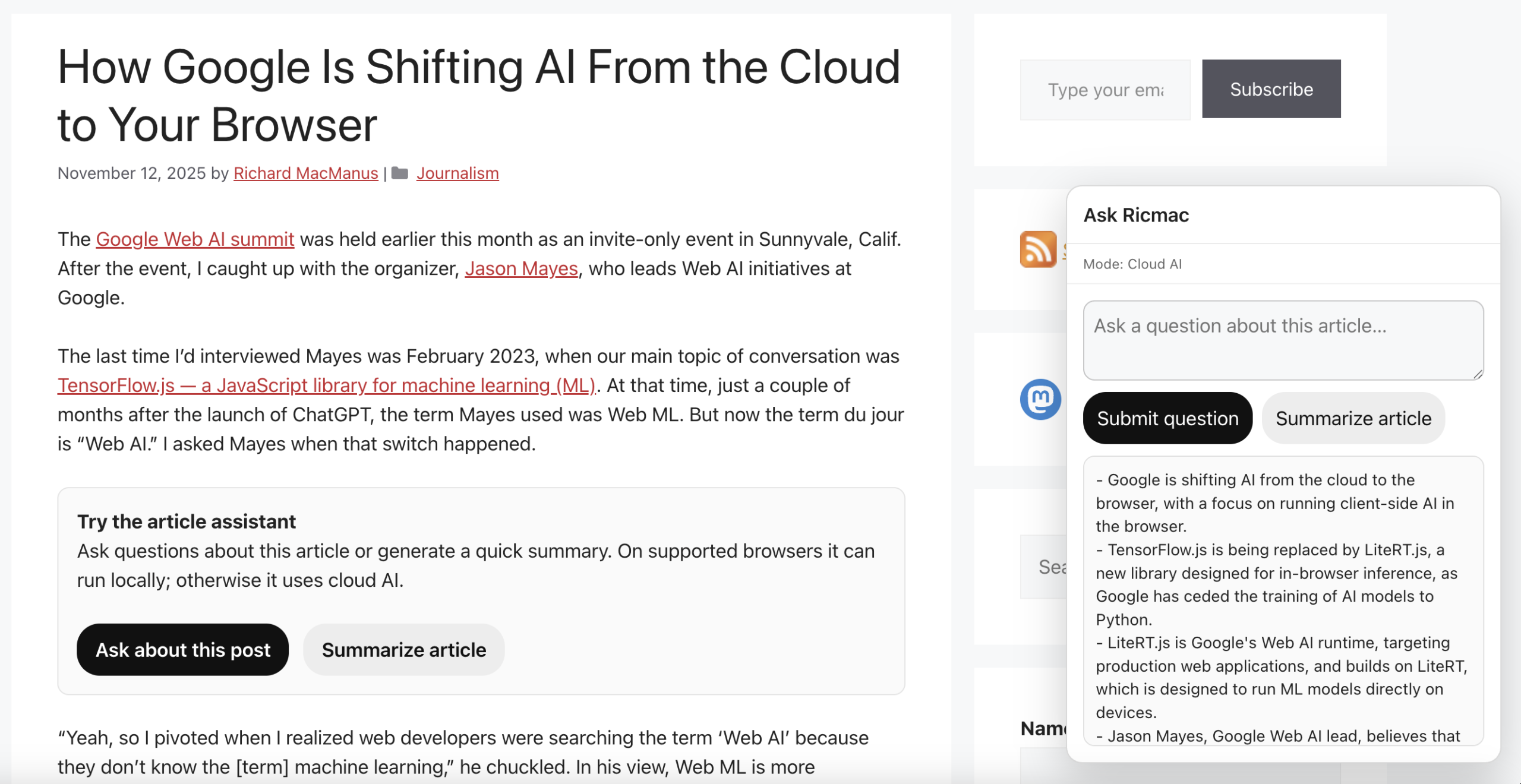
The routing logic in this system is deliberately simple. Rather than trying to evaluate the quality of responses or score different models, the decision is made upfront based on capability:
- If local AI is available in the browser, the query is handled locally
- If not, it falls back to the cloud
This reflects the current state of local AI on the web. As noted above, browser-based models like Gemini Nano are still experimental and only work under specific conditions, so availability necessarily becomes the primary routing signal.
Over time, this could evolve into something more dynamic — where the system tries local first and escalates to the cloud for a better answer, if needed. But for now, a capability-based router keeps things predictable and easy to reason about.
One subtle UX issue emerged from this: how to communicate which route will be used. After the user clicks the “Ask about this post” button, a popup displays with a prompt to ask a question. But until the user clicks the submit button, it’s unclear if the system will choose local or cloud AI. So as a default, I put “Mode: Ready.” Then when the user submits the question, the mode status will change to either “Local AI” or “Cloud AI,” depending on what is available.
The cloud path: adding context and scale
For the fallback, I’m using a cloud-based pipeline that uses a subset of the Cloudflare AI tools that my Ask Ricmac feature uses.
The main difference is that Ask Ricmac is a site-wide chatbot, whereas Article Assistant is limited to a single article. In the latter case, the browser sends selected chunks of the article to a Cloudflare Worker, which then calls a cloud model to generate the answer. So there’s no need for a vector database or sitewide retrieval layer, because the relevant context is already present in the page.
What I ended up with is a single interface — the “Ask about this post” box — backed by two very different execution environments:
- The browser (local, small model)
- The cloud (larger external model)
From the user’s perspective, this complexity is mostly hidden. They just ask a question and get an answer. Curious readers may notice the mode status, but it’s not essential to use the feature.
What this experiment suggests about the Agentic Web stack
Building this has clarified something for me about where the Agentic Web stack is heading.
We’re moving toward a model where:
- The browser will increasingly run lightweight and/or privacy-centric AI tasks locally;
- The cloud will remain the default path for heavier reasoning and broader context (simply because that’s where larger models will always live); and
- Websites will orchestrate between the two.
This is quite different from the current paradigm, where almost all AI interactions are centralized in a handful of platforms. What I love about the “local AI” paradigm is that intelligence will become more distributed and more under the control of the user — both key factors in web systems.
Giving your website visitors a way to use their own personal AI model to interact with your web content is a huge boon for the open web.
Think about how much power ‘big tech’ has on our online lives these days, with its opaque algorithms and invasive data snooping. If you’re able to offer your web readers a way to use their own personal AI model to interact with your website, that’s a huge boon for the open web.
One further note: even though I do expect the cloud to always be where the most sophisticated AI models will live, we can reasonably expect local models (like Gemini Nano) to rapidly increase in power. As Jason Mayes, who leads Google’s Web AI efforts, put it to me last November, “at some point, we’re going to have a model in the future that’s as good as today’s cloud models, [but] that fits on-device.”
When that happens, Mayes thinks that “maybe for 95% of use cases, you won’t need to delegate to the cloud.” In other words, local AI might soon become the default option for websites and web applications — rather than the exception that it is today.
What’s next
There are a lot of directions this could go next:
- Smarter routing (e.g. deciding upfront whether a query needs the cloud)
- Better use of local models (as they improve)
- Deeper integration with page capabilities (via WebMCP-style tools)
- More transparent UX around how answers are generated
But even in its current form, this experiment feels like a glimpse of something larger. It’s more than just “AI on the web.” This feels like AI adapting to the best aspects of the web: giving users more control, giving web publishers more options on how to use their content, removing some of the cloud-based leverage Big Tech has over us, and better privacy for all.
Feature image via Unsplash.