

One of the most interesting ideas emerging in the Web AI ecosystem is that websites themselves can expose capabilities directly to AI agents. Instead of scraping pages or relying entirely on APIs, an agent can interact with a site through structured tools defined by the site owner. I love this, because it gives power (or, ahem, agency) back to website owners.
Structured tooling is a core idea behind Model Context Protocol (MCP): websites or applications publish capabilities — such as searching content or performing actions — and AI systems can call those capabilities as tools.
In the browser environment, that idea is evolving into WebMCP: a model where web pages expose MCP tools directly to the browser so that AI assistants running there can interact with them.
But WebMCP is still very early. It isn’t a formal web standard yet and is currently being discussed in a W3C community group exploring how AI agents could interact with web pages. So one of the most practical ways to experiment with this architecture today is through MCP-B (the “B” stands for “browser”), an extension that acts as a bridge between web pages and MCP-compatible AI agents.
However, things are moving fast. Last month, Google released an experimental implementation of WebMCP-style browser tooling as an early preview in its Chrome Canary development browser. So once a version of this is released more widely in Chrome and other browsers, you won’t need a browser extension to run WebMCP on your website.
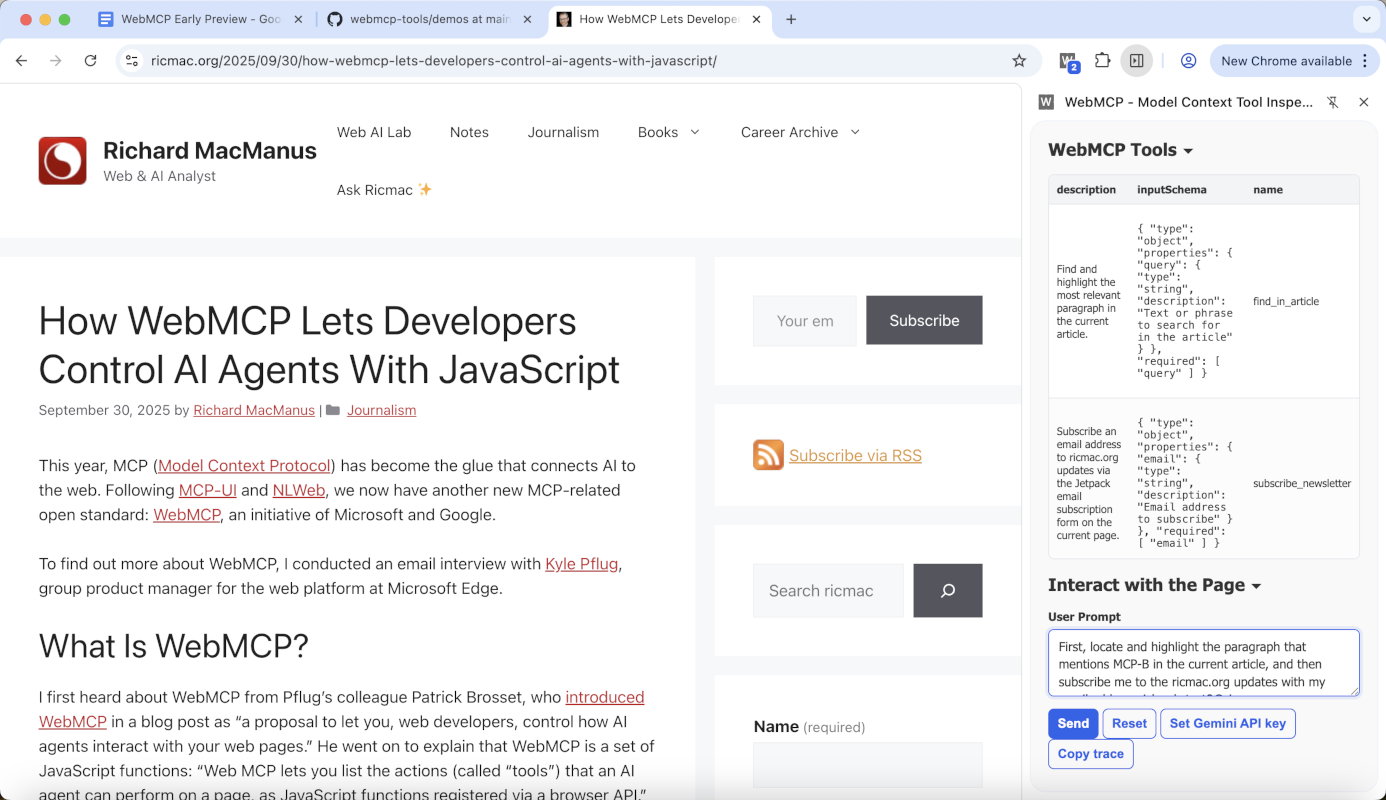
For now, there are two different approaches to implementing WebMCP:
- MCP-B, which acts as a bridge for today’s browsers.
- WebMCP in Chrome Canary, an early preview of native browser support.
I tested both approaches on my personal site, ricmac.org, and I’ll describe my findings in this post. Together, they offer a glimpse of how websites may soon become AI-interactive surfaces rather than passive pages.
MCP-B: a bridge for today’s browsers
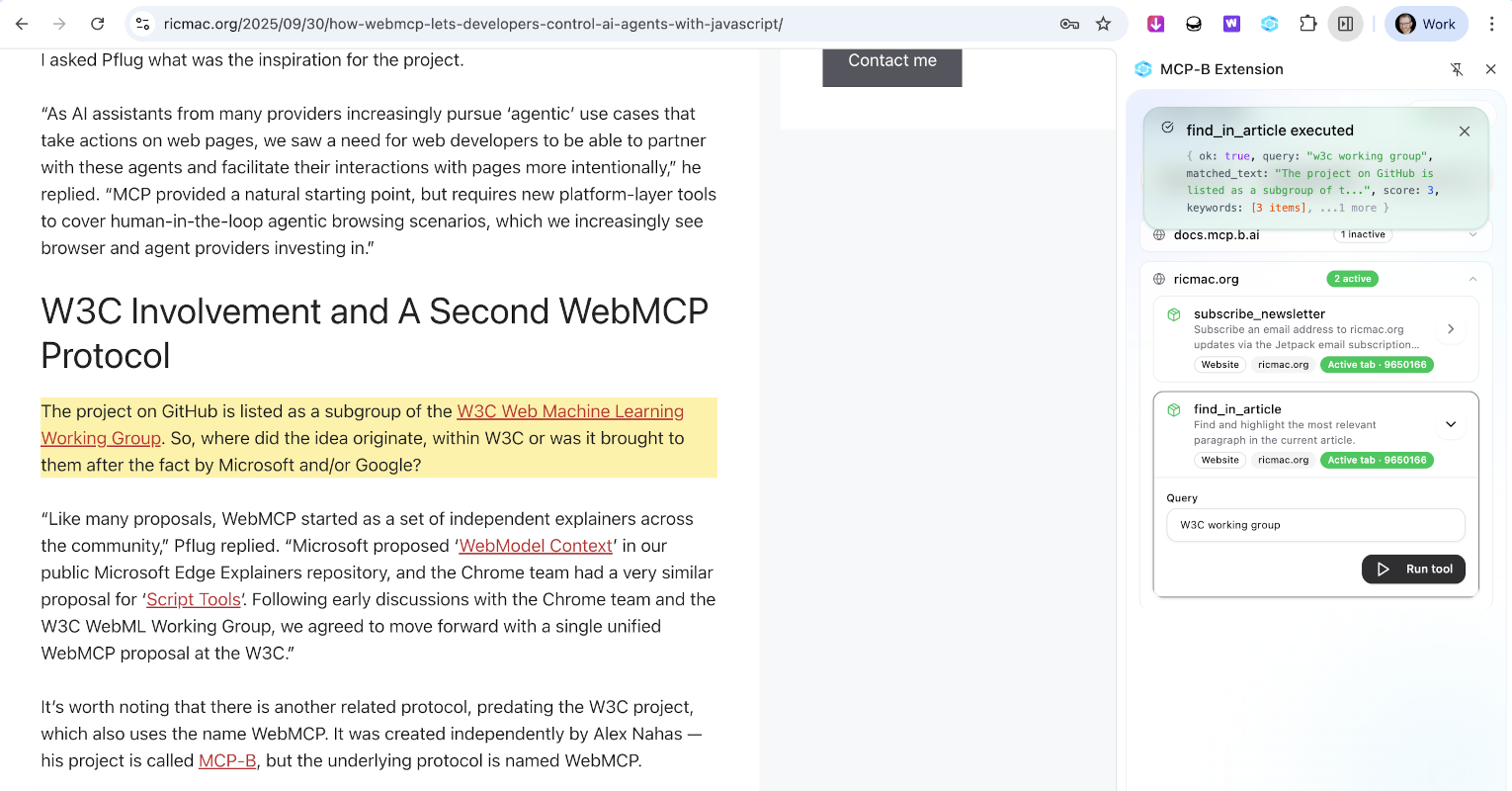
You can think of MCP-B as a kind of polyfill for WebMCP. It enables web pages to register MCP tools using JavaScript, while the extension — which works with Chrome, Edge and Firefox — handles the communication between those tools and an AI agent.
In other words:
- The web page defines the tools; and
- The extension exposes them to the agent.
For my experiment on ricmac.org, a WordPress site, I implemented two simple tools:
- subscribe_newsletter: Subscribes an email address to updates via my site’s Jetpack email subscription system.
- find_in_article: Searches the current page for a relevant paragraph and highlights it.
I chose those two use cases because they would show off the ability of WebMCP to take browser actions on my website. This is different to how my Ask Ricmac chatbot works, which is by calling an MCP server running in Cloudflare Workers — in other words, the AI functionality runs in the server and is sent back to my website. But with WebMCP, an agent can interact with the website itself, in the browser, in order to accomplish a task: in this case, subscribing to my site via email and/or searching an open article.
Sidenote: these two use cases are relatively simple examples that allowed me to understand WebMCP from a web publisher perspective. For a deeper developer dive, I recommend RL Nabors’ interview with MCP-B creator Alex Nahas, which gets into the technical weeds more than this post will do.
So, how does MCP-B work? The WebMCP tools are defined directly in the browser using the navigator.modelContext.registerTool() interface. The web page describes the tool’s name, purpose and input schema, and then provides an execution function.
Conceptually it looks like this:
navigator.modelContext.registerTool({
  name: "find_in_article",
  description: "Find the most relevant paragraph in the current article",
  inputSchema: {...},
  execute(args) { ... }
})
When the MCP-B extension is installed, it listens for these tool registrations and exposes them to a connected AI agent.
The interesting part is where the logic runs. Unlike traditional MCP servers — which run in a backend environment — these tools run inside the web page itself. That means they have direct access to the DOM, allowing the AI assistant to interact with the page’s content and interface. Because the tools run inside the page context, an AI assistant can only invoke capabilities that the page itself explicitly registers.
For example, the find_in_article tool I implemented scans paragraph elements in the page, identifies the best match for a query, and then visually highlights the result. From the user’s perspective, the AI assistant can point to a specific part of the article, rather than the user having to scroll down the page and find the relevant section manually.
This architecture effectively turns a normal website into an interactive surface that AI agents can operate on.
However, MCP-B is ultimately a workaround and depends on a browser extension. The long-term goal is to make this capability native to the browser. That’s where WebMCP comes in.
WebMCP in Chrome Canary
Google’s Chrome team has begun experimenting with native browser support for WebMCP, currently available as an early preview in Chrome Canary.
Where MCP-B relies on an extension bridge, WebMCP moves the functionality directly into the browser runtime.
The conceptual model remains the same:
- Web pages register tools; and
- The browser exposes those tools to an AI system.
But in the native implementation, the browser itself becomes the mediator rather than an extension.
From the website developer’s perspective, the code looks almost identical to the MCP-B version. The same navigator.modelContext.registerTool() interface is used to declare capabilities. The difference is what happens after registration.
In the WebMCP model:
- The page registers its tools;
- The browser makes those tools available to the assistant running in the browser environment; and
- The assistant can invoke them directly.
This architecture treats web pages almost like mini MCP servers embedded in the browser environment.
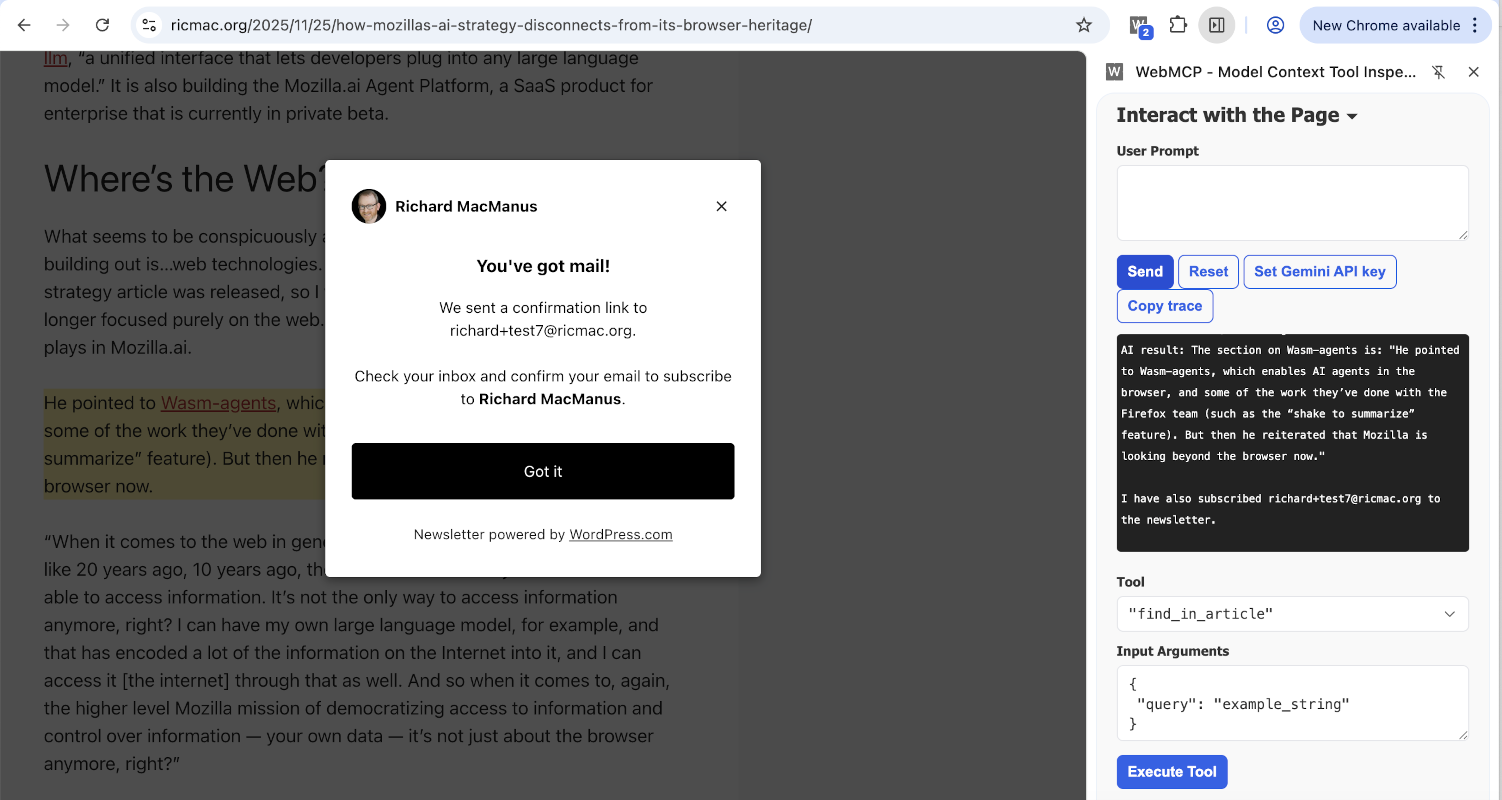
For my ricmac.org prototype, I reused the same two tools — email subscription and article search — and tested them inside Chrome Canary with WebMCP enabled.
The result was effectively the same user experience as MCP-B:
- The AI assistant could ask the page to search for a passage.
- The page highlighted the relevant section.
- The assistant could initiate an email subscription flow.
But the underlying architecture was cleaner. There was no extension bridge and no separate bridge process required. The browser itself handled exposing the page’s tools to the assistant.
Why this matters for the web
These early experiments hint at a larger shift in how websites may evolve in an AI-native web.
Today’s web pages are primarily designed for human readers. AI systems interact with them indirectly — through scraping, APIs, or retrieval pipelines.
WebMCP introduces a different model: sites can explicitly expose capabilities designed for AI agents.
In practice this means a website might publish tools such as:
- search this article
- retrieve structured data from this page
- perform a transaction
- subscribe to updates
- navigate a site’s content
Instead of parsing HTML, the agent calls a well-defined capability. This avoids brittle scraping logic and gives site owners control over what capabilities are exposed.
From a developer perspective, this resembles how the web evolved with JavaScript APIs. Over time, browsers standardized interfaces for things like geolocation, notifications, and storage. WebMCP could become a similar layer for AI interaction.
If that happens, websites won’t just present information, but will also expose agent-accessible functionality.
A small step toward an AI-native web
My implementation on ricmac.org is a small experiment — just two simple tools running in the browser. But it illustrates a key idea: websites can participate directly in the AI ecosystem without requiring complex backend infrastructure.
Using MCP-B, that capability is already possible today through a browser extension bridge. With Chrome Canary’s WebMCP preview, we can also see how the same idea might work when it becomes a native browser feature.
Whether WebMCP becomes a widely adopted standard remains to be seen. But the direction is clear: the boundary between web pages and AI systems is starting to blur. Certainly, this kind of technology will reshape how websites are built in the years ahead.
If you have the MCP-B browser extension installed and/or you have Chrome Canary, do test this WebMCP functionality on my website. I’d love your feedback, so please leave a comment on this post or tag me on Mastodon, Bluesky or LinkedIn.
Photo of canary by Jelle Taman on Unsplash.